How to Activate/Restore Your BlockerX Premium Purchase on iOS?
If you’re encountering issues with your premium activation on the BlockerX app for iPhone or iOS devices, don’t worry! We’ve got you covered with a simple “Restore” flow that will help you get back on track in no time. Just follow the steps below to restore your purchase and continue enjoying premium features.
Steps to Follow:
- Open the BlockerX App:
- Launch the BlockerX app on your iPhone.
- Launch the BlockerX app on your iPhone.
- Tap on the “Get Started” Button:
- Once the app is open, tap on the “Get Started” button to proceed.
- Once the app is open, tap on the “Get Started” button to proceed.

3. Navigate to the Purchase Plans Section:
- Continue navigating through the screens until you reach the purchase plans section.
4. Find the “Restore” Button:
- Scroll to the very end of the purchase plans screen.
- Look for the “Restore” button located at the bottom.
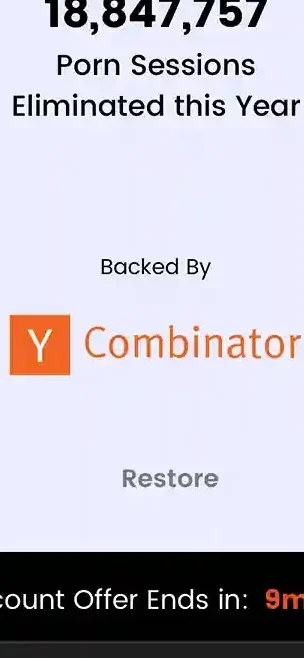
5. Click on the “Restore” Button:
- Tap on the “Restore” button to initiate the restoration process.
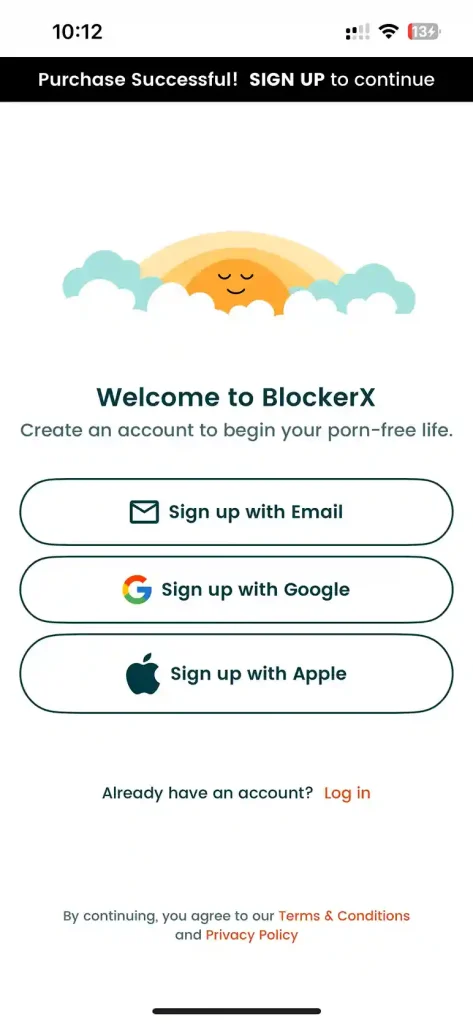
6. Log In to the App:
- After clicking “Restore,” log in to the BlockerX app using your credentials.
- This step ensures that your restored purchase is linked to your account.
Conclusion
Following these simple steps will help you restore your premium purchase on the BlockerX app effortlessly. If you encounter any difficulties or have further questions, feel free to reach out to our support team for assistance. With this guide, you’ll be back to enjoying the premium features of BlockerX in no time!