Free Porn Blocker for Iphone
Secure your digital world and eliminate explicit content – download our iOS app to block porn and browse with peace of mind!

AS FEATURED IN 🚀




Free Features

Educational Resources
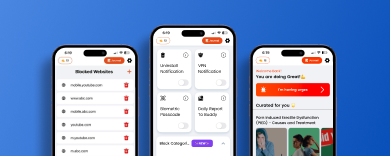
Free video courses and articles written by expert to control your urges.

Website Blocking
You want to block a specific website? Just add it and it will be blocked.

Community
Community of more than 100k active users to help you in your porn addiction journey.
Premium Features
Porn Blocker
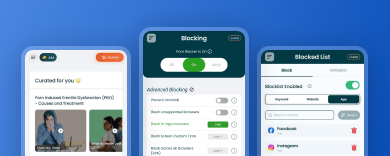
Block all porn websites in one click.

Add Buddy
You will need the permissions of your buddy to disable the blocker.
Panic Switch
Block internet for 15 Minutes, 30 Minutes etc. And control your urges to watch porn.
Hear it from our users
Our users love us
Juan El Bean


A fantastic app. Like most good habit changing apps, it takes away the need for willpower to achieve the goal. Highly recommended.”
Ian Tighe
A fantastic app. Like most good habit changing apps, it takes away the need for willpower to achieve the goal. Highly recommended.”
Anonymous
A fantastic app. Like most good habit changing apps, it takes away the need for willpower to achieve the goal. Highly recommended.”
Get BlockerX Premium
Commit to your Recovery
Annual Plan
$109.96
Billed $239.64 $109.96 every year
- Accountability Partner
- Uninstall Protection on Android
- Uninstall notifications on iOS
- Access to Community
- Auto-Syncing
- No Ads
Supported on


Renews automatically, unless cancelled
Best Value
Lifetime Plan
$129.82
One time payment of $479.28 $129.82
- 3 day money-back guarantee
- Accountability Partner
- Uninstall Protection on Android
- Uninstall notification on iOS
- Access to Community
- No Ads
- Auto-Syncing
Supported on
3 Day Money-back Guarantee
How to Block Porn Using BlockerX (Free Porn Blocker Iphone)
To block pornographic content using the BlockerX iOS app, follow these steps:
- Click on the Get it Now/ Get BlockerX for a Lifetime Button on this Page.
- Make Payment.
- You’ll get a download link on your registered mail id.
- Download and install the app on your device.
- Launch the BlockerX app: Open the BlockerX app once it’s installed on your iOS device.
- Set up your account: Sign up for a new account if you don’t have one or log in with your existing BlockerX account.
- Grant necessary permissions: BlockerX requires certain permissions to function correctly. Follow the on-screen prompts to grant the necessary permissions, including VPN access, as per the app’s requirements.
- Enable the Porn Blocker feature: In the BlockerX app, navigate to the settings or preferences section. Enable the “Porn Blocker” feature to activate the porn blocking functionality of the app.
- Customize blocking settings: BlockerX allows you to customize your blocking settings. You can set specific categories to block, such as explicit content, gambling, social media, or any other categories available in the app.
- Save your settings: Once you have selected the desired blocking categories and customized the settings, save your changes.
- Activate the blocking feature: Enable the blocking feature within the BlockerX app. This will activate the blocking functionality according to your chosen settings.
- Test the blocking feature: Open a browser or any app that falls under the selected blocking categories. You should see a message or be redirected to a blocked page, indicating that the access to explicit content is restricted.
Are there any third-party porn blocker apps available for iPhone?
Yes, Blockerx is available for iPhone on the App Store. You can easily download it from there.
Is Blockerx iPhone app is free to download?
Yes, you can download free but for service you have to purchase the plan.